A cozy gaming setup should still leave you somewhere to play. Start with the screen, input devices and chair space you actually use. Add lighting and storage around that working area, then choose the colors and small objects that make it feel like your room.
A useful starting order
- Keep the keyboard, mouse and chair route clear.
- Choose task light separately from decorative light.
- Give moved items a place to return to.
Choose the arrangement before the accessories
| Your routine | Prioritize | Leave room for |
|---|---|---|
| Keyboard-and-mouse gaming | Screen position, keyboard layout and mouse movement | A clear forearm area and chair route |
| Work by day, games at night | A useful writing or laptop area alongside the input devices | Moving between tasks without rearranging the whole desk |
| Controller or handheld gaming | Reachable controls, a supported device position and a place to put it away | Charging access and a clear seat |
| A shared living room | Equipment that has a real storage location | The room's other uses once the session ends |
One monitor with a suitable stand can be a better starting point than two screens squeezed onto a desk. A second display is useful only if your work or games give it a job. Likewise, a shelf should hold items you want to see or reach, rather than filling the wall just because the reference has a shelf.
Start with the surface and the chair route
Measure the room and the furniture you already own. Include the full desk depth, the chair's movement and nearby drawers, doors and curtains. Pull the chair back as you normally would and check whether you can leave the desk without squeezing past the bed or blocking someone else's path.
Plan the desk from the seated position. Put the keyboard and mouse where you can use them, then place the display around that position. Check the monitor stand's footprint rather than treating the screen width as its only dimension. Leave space for the actual base, not an imaginary thin support hidden by the image.
A compact keyboard can leave more room beside it, but the missing keys may matter to your work. Choose the layout and connections first. A desk mat can visually group the input devices; its dimensions should accommodate your real mouse movement rather than forcing everything into a tiny rectangle.
If considering a monitor arm, check the exact screen's weight and mounting pattern, the arm's capacity and adjustment range, and whether your desk can take its mounting method. A clamp does not fit every desk edge, and some desk materials need different treatment. A riser is a separate choice: it still occupies surface area and needs room for its legs or supports.
Give task light and ambient light different jobs
Task lighting is there for the keyboard, notes or other things you use. Ambient lighting changes the surrounding room. A warm wall panel, small decorative lamp or illuminated shelf can look inviting without supplying enough light for a particular task.
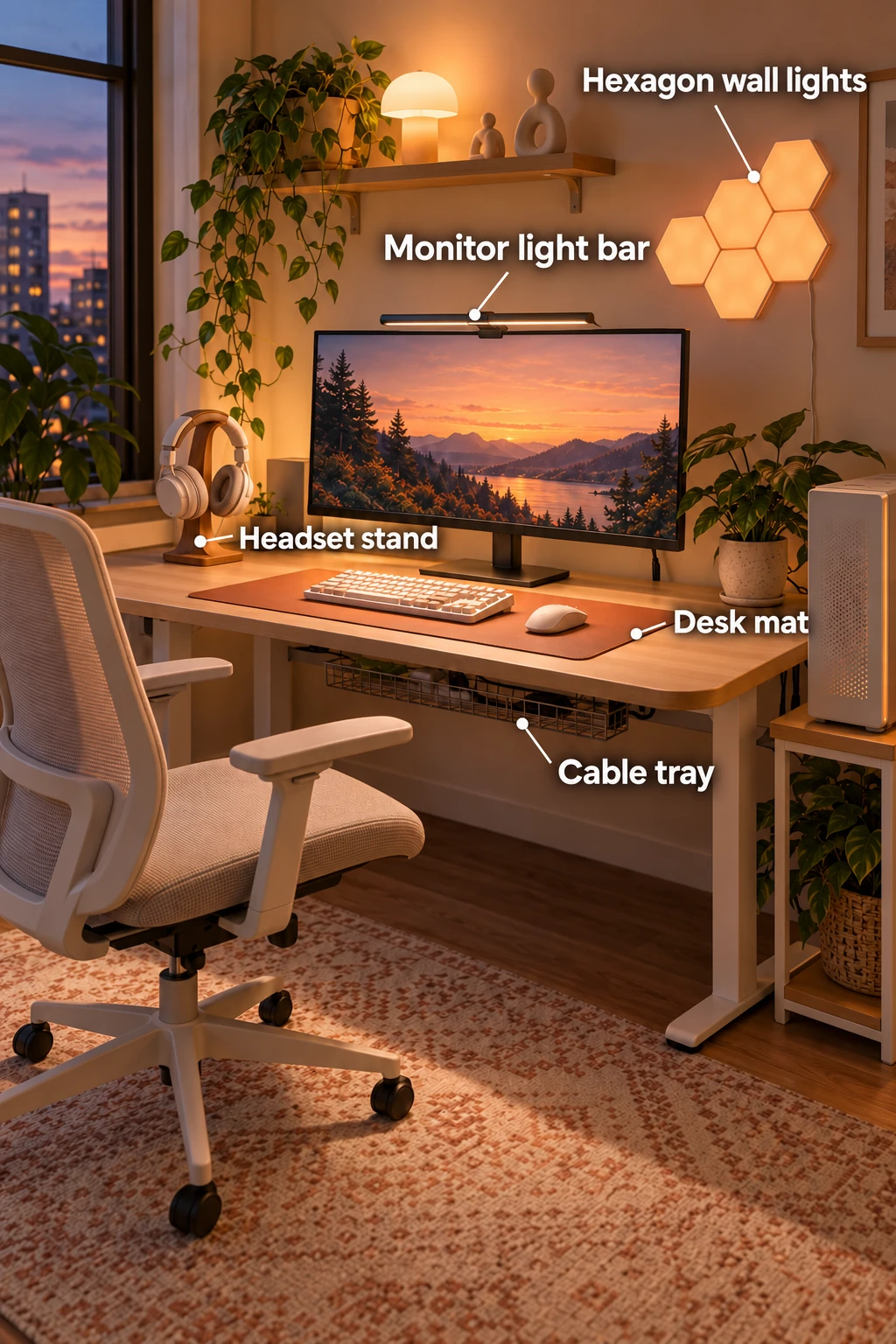
The reference uses a monitor light bar for the working surface and hexagonal wall lights for atmosphere. These are descriptive labels, not brand identifications. For a real light bar, check the exact screen shape, thickness, mounting area and power requirement. A curved display, unusually thin bezel, webcam or a bulging back can change the fit. Avoid assuming that two similar-looking bars share the same clamp or controls.
Choose a place to reach the controls. A remote adds another object to store; touch controls on a bar need to be accessible without repeatedly disturbing its position. Decorative lights also need a credible power route. Do not hide a cable behind furniture in a way that prevents following the product's installation instructions.
For wall-mounted lights, follow the maker's actual surface, mounting and removal instructions. “No drilling” does not mean suitable for every wall or guaranteed damage-free removal. If you cannot use the required mounting method, a freestanding decorative light can be a different way to introduce atmosphere. Check whether it is corded, battery-operated or rechargeable, and whether batteries or a power adapter are included.
Read our small-bedroom lighting guide for a separate comparison of bedside task and ambient roles.
The pieces in the reference
The five image callouts highlight some of the smaller functional pieces. This list also covers the main furniture and supporting items. Exact dimensions and compatibility belong to the product you choose, not to the generated scene.
| Piece | What it contributes | Check before choosing |
|---|---|---|
| Desk and supports | A stable working surface | Full depth, legroom, load and the desk maker's instructions |
| Adjustable desk chair | A place to sit and move between tasks | Seat and arm dimensions, adjustments and room to leave the desk |
| Monitor and stand | A supported display | Actual base footprint, desk support and your display requirements |
| Monitor light bar | Light directed toward the working area | Exact monitor shape/thickness, mount and power |
| Hexagon wall lights | Decorative wall lighting | Starter-kit contents, connections, surface and removal instructions |
| Small decorative lamp | A separate point of ambient light | Power source, placement and included components |
| Compact keyboard | Input without automatically using the full desk width | Layout, platform support and connection |
| Mouse | Pointer control | Hand preference, connection and a clear moving area |
| Desk mat | A defined keyboard and mouse area | Dimensions, material and cleaning guidance |
| Headset and stand | Audio equipment with a storage position | Connections, actual stand support and reach |
| Under-desk cable tray | A supported route for cable organization | Mounting, desk construction, cable reach and access |
| Display shelf | Space for small objects away from the input area | Wall and fixing suitability, load, screen clearance and reach |
| Plant and pot | Greenery and a change in texture | Light needs, mature size and watering away from electronics |
| Low-pile rug | Texture and a visual boundary for the desk area | Edges, cleaning and how the actual chair moves over it |
| Computer tower and support | A location for the computer outside the chair route | Device dimensions, ventilation, support and access to connections |
The shelf's tiny decorative figures are optional finishing objects, not essential equipment. Use original or properly licensed designs. A theme can come from color, materials and shapes without copying a character poster or someone else's desktop artwork.
Store the things that interrupt the session
Give frequently moved objects a return location. A headset stand is useful when headphones would otherwise cover the keyboard. A controller holder should be reachable without crowding mouse movement. Small removable boxes can separate spare cables from the equipment you use every day.
Under-desk storage should not take over the space your knees need. A cable tray is not a way to force every adapter or device into a closed bundle: follow the equipment's ventilation and cable guidance. Leave connections accessible enough for cleaning and normal changes. Keep heavy equipment supported and liquids away from it.
A display shelf can free some desk area, but only if the objects move to a genuinely suitable location. Check mounting and load before putting a plant or collectible above equipment. Water a plant somewhere appropriate and return it afterward rather than letting drips reach electronics.
When the setup needs to pack away
A shared room may need a different solution from a permanent desk. A couch lapboard supports input devices while you use existing seating; it does not automatically carry a computer and monitor. A wheeled laptop cart depends on its intended device load and its base. An integrated reclining workstation is a larger equipment decision with its own assembly, access and display compatibility requirements.
Choose by what must move: just the keyboard and mouse, a laptop, or a whole workstation. Identify where the equipment will live when stored and check that route as well as the operating position. Do not copy a monitor mounted to a kitchen trolley and assume that its stability has been established.
If the room also contains your bed, keep the sleeping and desk routes usable. The existing bedside-storage guide can help you assign nighttime essentials their own place instead of extending desk clutter across the room.
Build in a useful order
Keep the furniture and devices that already work for you. Resolve the seating, working area and supported screen position first. Then add any task light you need, followed by storage for the objects that keep getting in the way. Use ambient light, a mat, textiles and a few personal objects to bring the room together.
A coherent setup does not need every accessory in the reference. It needs pieces that fit your equipment, your space and the way you spend time there.